
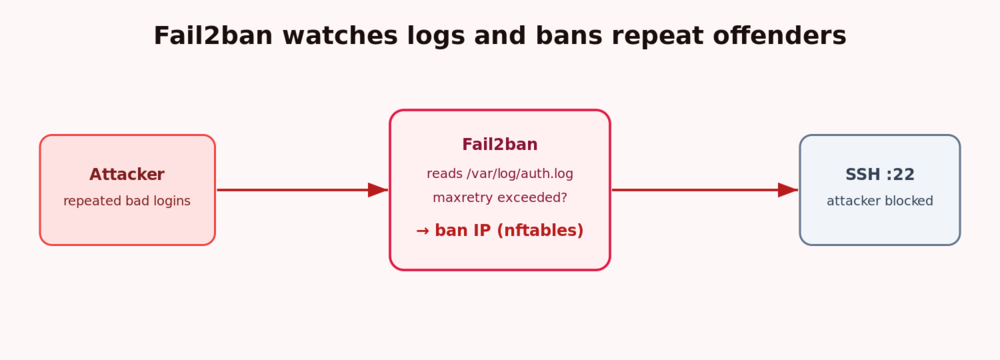
Any VPS with a public IP will see automated SSH brute-force attempts within minutes of booting. Fail2ban watches your logs, and when an IP fails to log in too many times it bans that address at the firewall for a while. This guide installs and configures Fail2ban to protect SSH on Ubuntu 24.04 LTS.
Prerequisites
- An Ubuntu 24.04 LTS server, e.g. a VPSie cloud VPS.
- A
sudouser and SSH access — ideally already hardened with key-based login.
Step 1 — Install Fail2ban
sudo apt update
sudo apt install -y fail2ban
Step 2 — Create a local configuration
Never edit jail.conf directly (package updates overwrite it). Put your settings in jail.local, which overrides the defaults:
sudo nano /etc/fail2ban/jail.localStep 3 — Configure the SSH jail
Add the following. Replace 203.0.113.10 with your own IP so you can never be locked out:
[DEFAULT]
# Ban for 1 hour after 5 failures within 10 minutes
bantime  = 1h
findtime = 10m
maxretry = 5
# Never ban these addresses (localhost + your trusted IP)
ignoreip = 127.0.0.1/8 ::1 203.0.113.10

[sshd]
enabled = true
On Ubuntu 24.04 the sshd jail reads the systemd journal automatically, so no log path is required.
Step 4 — Enable and start Fail2ban
sudo systemctl enable --now fail2ban
sudo systemctl status fail2ban
Step 5 — Check the jail
sudo fail2ban-client status
sudo fail2ban-client status sshd
The sshd status shows currently failed and banned IP addresses.
Step 6 — Unban an address
Accidentally banned yourself or a colleague? Release the IP instantly:
sudo fail2ban-client set sshd unbanip 203.0.113.55Step 7 — Escalate repeat offenders (optional)
Enable the recidive jail to hand out much longer bans to IPs that keep coming back after shorter bans — a simple way to shut down persistent attackers.
Next steps
- Close every unused port with a firewall: set up a UFW firewall.
- Remove password logins entirely: SSH key hardening.
Conclusion
Fail2ban now turns the constant background noise of brute-force attempts into automatic, temporary bans — no manual log-watching required. Combined with a UFW firewall and key-only SSH, your VPS presents a very small, well-defended attack surface.