Docker lets you package an application and everything it needs into a lightweight, portable container that runs the same way on any machine. Docker Compose builds on that by letting you define and run a whole multi-container application from a single YAML file. This guide walks you through installing both on a fresh Ubuntu 24.04 LTS VPS and deploying your first real stack.
Prerequisites
- An Ubuntu 24.04 LTS server (a VPSie cloud VPS works perfectly).
- A user with
sudoprivileges. If you have not hardened access yet, see our guide on securing your Linux VPS with SSH key authentication. - A terminal connected to your server over SSH.
Step 1 — Update the system
Start with an up-to-date package index and install the few tools we need to add Docker’s repository securely:
sudo apt-get update
sudo apt-get install -y ca-certificates curl
Step 2 — Add Docker’s official GPG key and repository
Ubuntu’s default repositories often ship an older Docker build. Installing from Docker’s own repository guarantees you get the latest stable release and the Compose plugin.
sudo install -m 0755 -d /etc/apt/keyrings
sudo curl -fsSL https://download.docker.com/linux/ubuntu/gpg -o /etc/apt/keyrings/docker.asc
sudo chmod a+r /etc/apt/keyrings/docker.asc

echo
  "deb [arch=$(dpkg --print-architecture) signed-by=/etc/apt/keyrings/docker.asc] https://download.docker.com/linux/ubuntu
  $(. /etc/os-release && echo "$VERSION_CODENAME") stable" |
  sudo tee /etc/apt/sources.list.d/docker.list > /dev/null
Step 3 — Install Docker Engine and the Compose plugin
sudo apt-get update
sudo apt-get install -y docker-ce docker-ce-cli containerd.io docker-buildx-plugin docker-compose-plugin
The docker-compose-plugin package gives you the modern docker compose command (note the space — the old hyphenated docker-compose binary is deprecated).
Step 4 — Verify the installation
sudo docker run hello-world
docker --version
docker compose version
If Docker is working you will see a “Hello from Docker!” message confirming the engine pulled an image and ran a container.
Step 5 — Run Docker without sudo (optional)
Add your user to the docker group so you do not have to prefix every command with sudo:
sudo usermod -aG docker $USER
newgrp docker
Security note: members of the docker group effectively have root on the host. Only add trusted users.
Step 6 — Deploy your first stack with Docker Compose
Let’s launch a complete WordPress site (web + database) with one command. Create a project folder and a compose.yaml file:
mkdir ~/wordpress && cd ~/wordpress
nano compose.yaml
Paste the following, changing the passwords to strong values of your own:
services:
  db:
    image: mariadb:11
    restart: always
    environment:
      MARIADB_DATABASE: wordpress
      MARIADB_USER: wp_user
      MARIADB_PASSWORD: change_this_password
      MARIADB_ROOT_PASSWORD: change_this_root_password
    volumes:
      - db_data:/var/lib/mysql

  wordpress:
    image: wordpress:latest
    depends_on:
      - db
    restart: always
    ports:
      - "8080:80"
    environment:
      WORDPRESS_DB_HOST: db
      WORDPRESS_DB_USER: wp_user
      WORDPRESS_DB_PASSWORD: change_this_password
      WORDPRESS_DB_NAME: wordpress
    volumes:
      - wp_data:/var/www/html

volumes:
  db_data:
  wp_data:
Bring the stack up in the background:
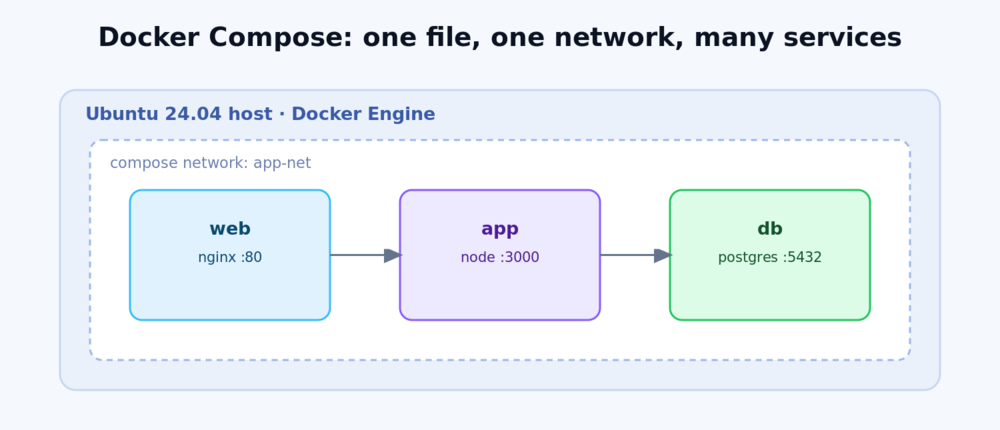
docker compose up -dOpen http://your_server_ip:8080 in a browser and you will be greeted by the WordPress installer — two containers, one network, zero manual configuration.
Step 7 — Manage your stack
docker compose ps        # list running services
docker compose logs -f   # follow logs
docker compose stop      # stop without removing
docker compose down      # stop and remove containers (named volumes are kept)
Next steps
- Put your app behind a proper web server with free HTTPS: set up Nginx as a reverse proxy on Ubuntu 24.04.
- Lock down the host with a firewall and key-only SSH — see SSH hardening for your Linux VPS.
- Keep images current with
docker compose pull && docker compose up -d.
Conclusion
You now have Docker Engine and Docker Compose running on Ubuntu 24.04 and have deployed a real multi-container application. From here you can describe any stack — app servers, databases, caches, queues — in a single file and reproduce it anywhere in seconds.