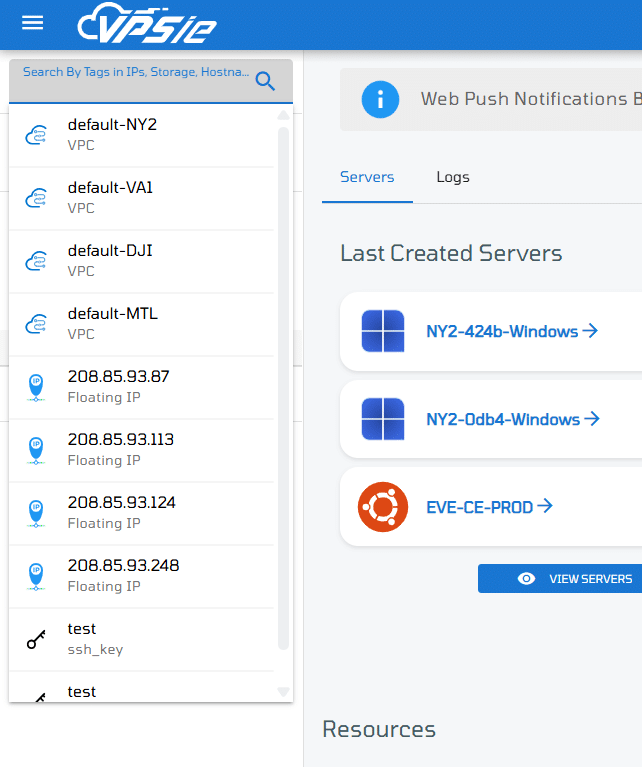

The Search feature in the VPSie control panel allows you to quickly locate your resources across the platform. Whether you’re managing a large number of virtual machines, storage buckets, snapshots, or firewall rules the search bar helps streamline your workflow.
Key Features:
- Global Search Bar: Located at the top of your control panel, accessible from any page.
- Tag-Based Search: Use tags to categorize and easily filter your resources.
- Type Filtering: Narrow your search by selecting resource types such as VMs, storage, snapshots, networks, or security rules.
- Real-Time Suggestions: Results populate instantly as you type.
Using Tags for Better Organization
You can assign custom tags to your resources during or after creation. These tags make it easier to:
- Group resources by project, environment (e.g., prod, dev), or owner.
- Search for related resources using a single keyword.
- Improve collaboration across teams.
How to Use the Search:
- Navigate to the VPSie control panel.
- Click on the Search bar at the top left corner.
- Type the name, IP address, tag, or keyword.
- Filter results using the dropdown options (optional).
- Click on any result to go directly to that resource.