VPSie API is a programmatic interface that empowers users to manage their virtual private servers (VPS) with ease. This API offers users the ability to automate various tasks associated with their VPS, including creating, deleting, starting, stopping, and restarting instances. It provides a flexible and customizable way to manage VPS resources, which can be integrated into diverse applications and systems.
In order to use the VPSie API, users must first create an account on the VPSie website and obtain an API key. This unique identifier is what grants users access to the API, allowing them to make API calls with different programming languages like Python, Ruby, PHP, and JavaScript. VPSie API employs RESTful web services, enabling users to interact with the API using standard HTTP methods like GET, POST, PUT, and DELETE.
The VPSie API comes equipped with a wide array of features, including advanced network and storage options, as well as customizable templates for creating and deploying VPS instances. Its design is intended to be scalable and reliable, making it ideal for managing small to large-scale VPS deployments with ease. Overall, the VPSie API is an effective tool that simplifies VPS management tasks and can significantly enhance user productivity.
📍 Where to Find the API Section
To access the API settings:
Navigate to:
My Account → Automation → API
This section allows you to manage secure API apps for integrating VPSie with external tools, systems, or custom scripts.
Creating a New API App
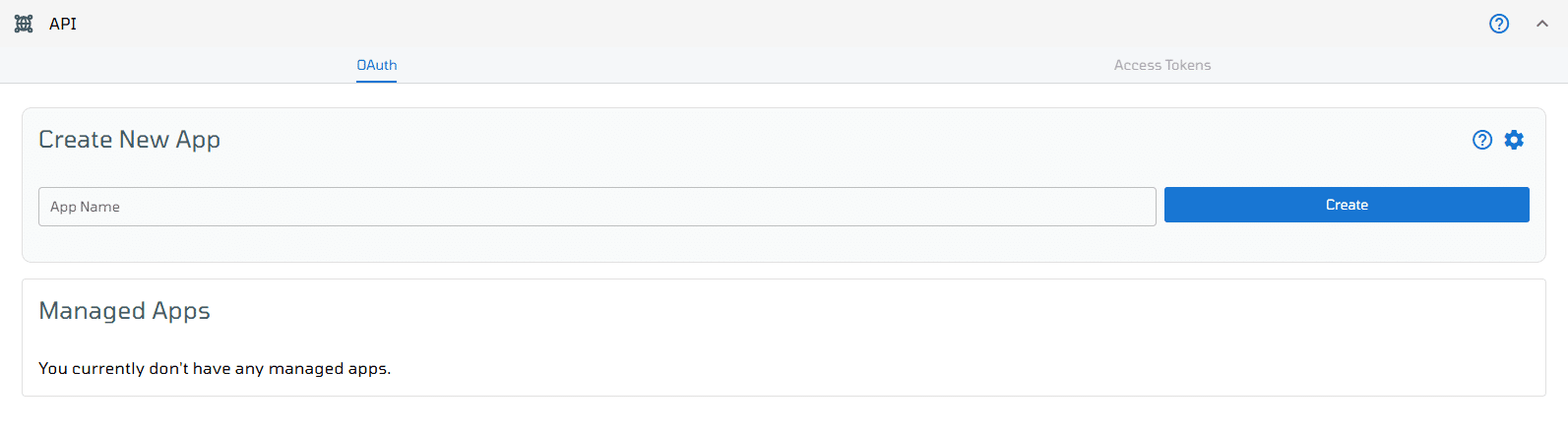
1. Once you are in the API section, you’ll see the “Create App” interface.
2. Enter your desired App Name in the provided field.
3. Click on Create to generate a new managed app.
Viewing and Managing App Settings
Once the app is created:
1. Click on the App Name to open the detailed settings page.
2. You’ll also see a toggle switch to enable or disable the app’s active status.
This is useful for temporarily pausing access without deleting the app.

Creating a New App OAuth Configuration
In the app settings page, you can configure OAuth for secure access:
1. Click Create New App OAuth.
2. Fill in the following fields:
Select a Role: defines what permissions the OAuth token will have.
Select IP Filter Type: choose between:
- Allowed – only listed IPs can access
- Banned – listed IPs will be blocked
3. Once done, click Create to finalize your OAuth setup.

Viewing and Managing OAuth Entries
Once the OAuth is created, it will appear in a list below. For each entry, the following details and actions are available:
1. Client ID: used for API authentication
2. Client Secret: keep this private
3. Assigned Role: the permission level applied
4. Show OAuth Credentials IPs: view configured IP filters
5. Update Activation Status: toggle OAuth access on or off
6. Show QR Code: for quick mobile integrations
7. Delete Option: remove the OAuth entry if no longer needed

Managing Access Tokens
In addition to app-based OAuth, VPSie also provides an option to generate Access Tokens directly from the API section ideal for long-term automation without needing OAuth.
How to Create an Access Token:
To create a new token:
1. Enter a Token Name
2. Set an Expiration Date
3. Select a Role for permission scope
4. Choose an IP Filter Type (Allowed or Banned)
Click Create Access Token to generate the token.
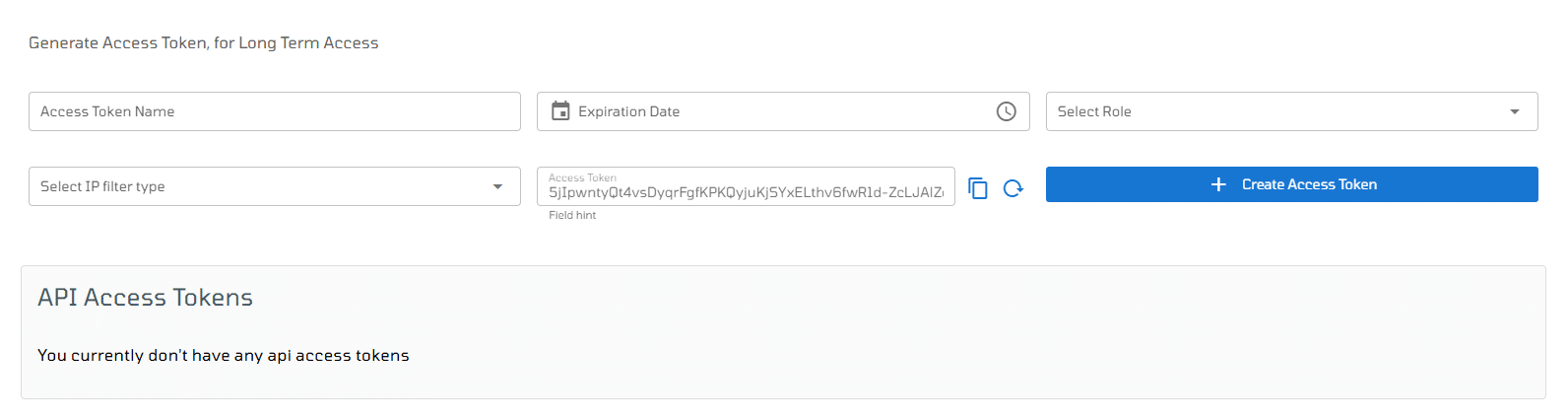
To modify the access token details, click on the pencil symbol. This will allow you to edit the name and expiry date and time of the access token.